
(Another guest post from Mike MacFarlane, who may be better known as @eloquamike)
===============================================
In the Eloqua community, we just celebrated our 2nd annual Eloqua Experience conference in San Francisco. It was an absolutely amazing event and one of the highlights was the conversation happening on Twitter.
In Steve’s previous post about creating social media buzz at an event, he mentioned something about our “Tweetboard” – a large screen showing a live stream of conversations happening on Twitter in relation to Eloqua Experience. We set this up primarily so that those who were at the conference could see that they was another conversation happening online.
Setting up a Tweetboard is really easy and can be by using a small snipit of code provided by a website called Hootsuite and Eloqua Hypersites (and maybe a little design instinct).
First, you need to create an account at http://www.hootsuite.com/. Once you have gone ahead and done that, you will be presented with a screen (that looks a lot like the popular tool TweetDeck). In the top right hand corner, there is a search button that you can use to enter in what key words or hashtags you want to search against:
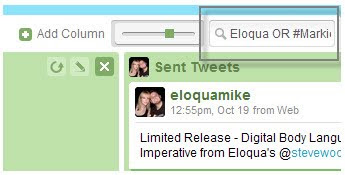
(note that if you are querying multiple terms, you will need to use an “OR” statement)
Once you have setup your search query, you will want to create a “Saved Column”:
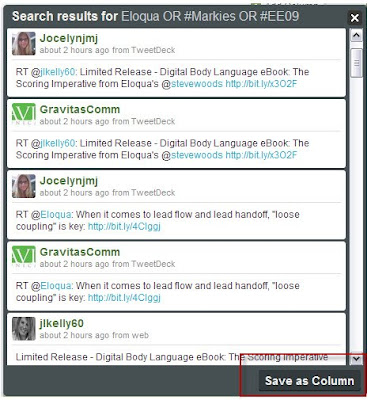
Once your column has been saved, you can generate some source code in which you can add to your blogs, website, etc. Simple select the “Embedd” button (which looks like <>):

You will then be presented with a screen that will give you options to help customize the look and feel of the feed:
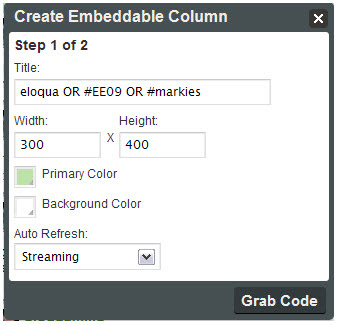
Once you have all your setting in place, simply select “Grab Code” and copy and paste the generated source code and place onto your blog, website, etc.
In my case, I took the code and placed it into our Eloqua Hypersite. We wanted to add a little branding and messaging to it, so I create a header image to sit above the feed that had the Eloqua Experience logo, as well as instructions on how to joing the conversation. The end product looked like this (you can also still see it live here):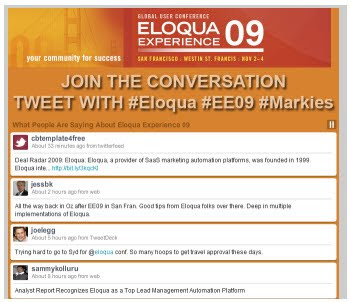
In Steve’s previous post about creating social media buzz at an event, he mentioned something about our “Tweetboard” – a large screen showing a live stream of conversations happening on Twitter in relation to Eloqua Experience. We set this up primarily so that those who were at the conference could see that they was another conversation happening online.
Setting up a Tweetboard is really easy and can be by using a small snipit of code provided by a website called Hootsuite and Eloqua Hypersites (and maybe a little design instinct).
First, you need to create an account at http://www.hootsuite.com/. Once you have gone ahead and done that, you will be presented with a screen (that looks a lot like the popular tool TweetDeck). In the top right hand corner, there is a search button that you can use to enter in what key words or hashtags you want to search against:

(note that if you are querying multiple terms, you will need to use an “OR” statement)
Once you have setup your search query, you will want to create a “Saved Column”:

Once your column has been saved, you can generate some source code in which you can add to your blogs, website, etc. Simple select the “Embedd” button (which looks like <>):

You will then be presented with a screen that will give you options to help customize the look and feel of the feed:

Once you have all your setting in place, simply select “Grab Code” and copy and paste the generated source code and place onto your blog, website, etc.
In my case, I took the code and placed it into our Eloqua Hypersite. We wanted to add a little branding and messaging to it, so I create a header image to sit above the feed that had the Eloqua Experience logo, as well as instructions on how to joing the conversation. The end product looked like this (you can also still see it live here):


